Looking for the best IPTV app for AppleTV? iPlayTV is one of the top choices — an Apple TV-exclusive IPTV player app that lets you stream your favorite live channels directly from an M3U playlist or via Xtream Codes. If you’re an Apple TV user looking for a clean, feature-rich way to watch IPTV, iPlayTV is the answer.
In this guide, we walk you through how to add your IPTV channels to iPlayTV in just a few minutes.
How to Add IPTV Channels to iPlayTV – Step by Step
Step 1 – Download iPlayTV and Add a Playlist
Download the iPlayTV app from the Apple App Store on your Apple TV. Once installed, open the app and tap “Add Playlist” to begin.
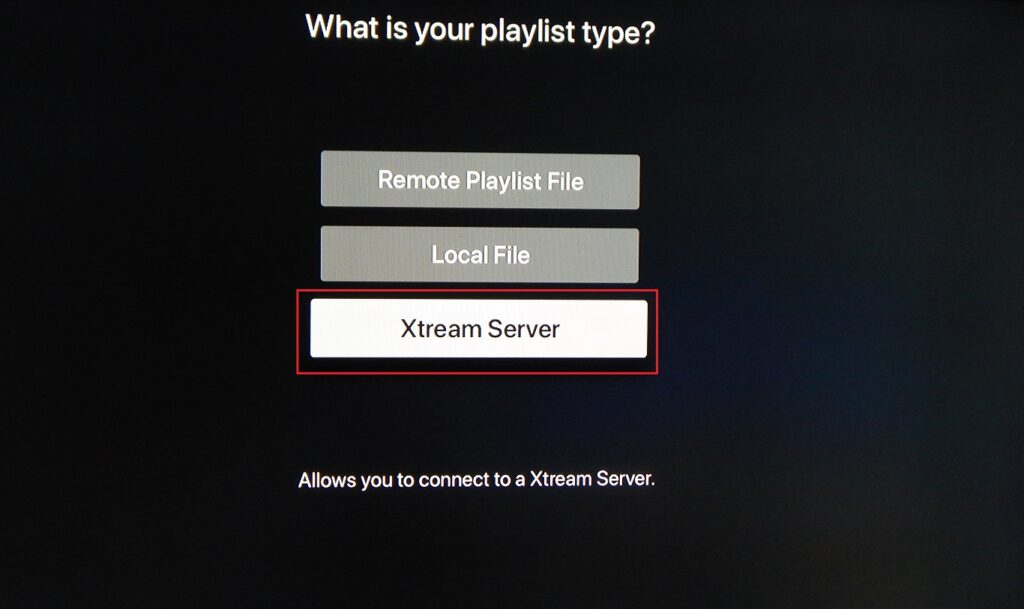
Step 2 – Select Xtream Server
From the playlist options, choose “Xtream Server” and tap to proceed. This is the recommended method as it uses the Xtream Codes API for a more stable connection and automatic IPTV EPG loading.
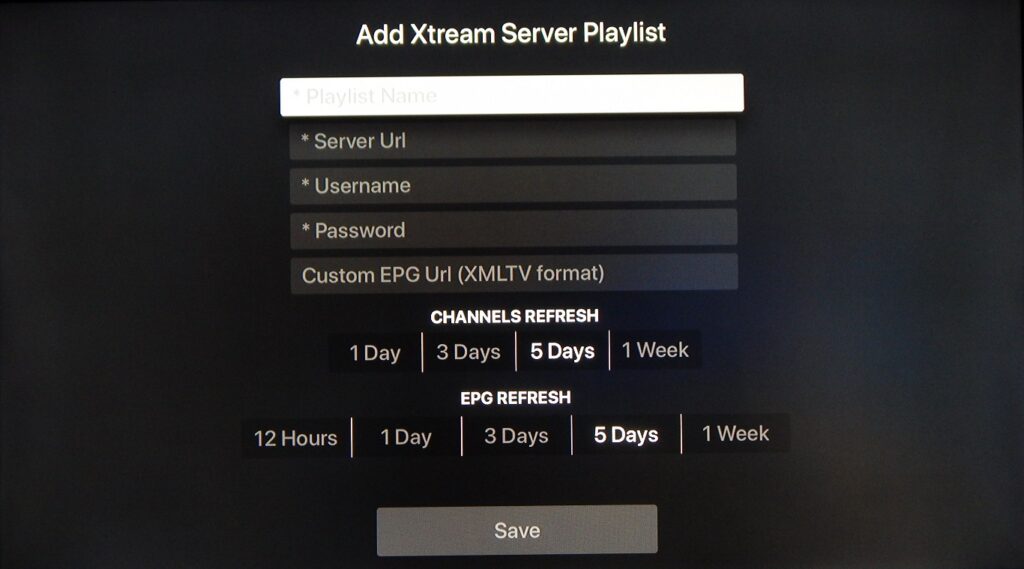
Step 3 – Enter Your Xtream Codes Credentials
Fill in the following fields and tap “Save”:
Playlist Name: Any label you prefer (e.g., “MY IPTV”)
Server URL: The server address provided by your IPTV provider
Username: Your IPTV username
Password: Your IPTV password
All of these details — Server URL, Username, and Password — can be found inside your M3U URL or in your IPTV provider’s personal dashboard. Most providers include the server address, username, and password directly within the M3U link format.
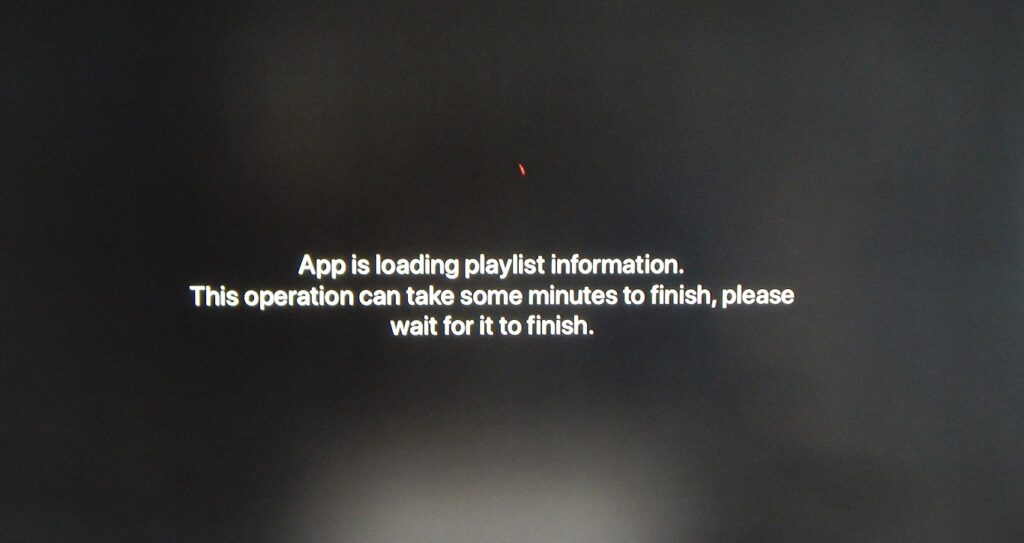
Your iPlayTV app is now configured and ready to stream IPTV channels on your Apple TV!
iPlayTV Key Features
iPlayTV is packed with features that make it one of the best IPTV apps available on Apple TV:
Multi-Playlists — Add and manage multiple M3U playlists from different IPTV providers in one app.
Channel Search — Search for channels across all playlists simultaneously.
Favorites & Reorder — Save your most-watched channels and organize them in your preferred order.
Channel Preview — Preview channels before switching (must be enabled in settings).
Automatic Channel Logos — iPlayTV automatically finds and displays Picons (channel logos) based on the channel name.
Full EPG Support — Complete IPTV EPG (Electronic Programme Guide) with support for EPG URLs using gzip/tar compression, so you always know what’s on.
Xtream Codes Support — Full Xtream Codes API integration for seamless setup and automatic EPG loading.
VLC + Apple Player — Built on both VLC and the native Apple player, iPlayTV supports the widest range of stream codecs — no buffering or format issues.
Multiple Audio & Subtitle Tracks — Switch between audio languages and enable subtitles for any channel.
AirPlay 2 — Cast your IPTV streams to any AirPlay-compatible device (note: if your Apple TV wakes from sleep, you may need to reselect the AirPlay output).
Simple, Easy-to-Use Interface — Designed for the Apple TV remote, making channel browsing intuitive and fast.
FAQs – iPlayTV App on Apple TV
1. What is iPlayTV?
iPlayTV is an Apple TV-exclusive IPTV player app that supports M3U playlists, Xtream Codes, IPTV EPG, and AirPlay 2. It’s widely considered one of the best IPTV apps for Apple TV due to its VLC-based engine and clean interface.
2. Is iPlayTV only available on Apple TV?
Yes — iPlayTV is exclusively available for Apple TV on the App Store. For iPhone and iPad, alternative IPTV apps such as IPTV Smarters or GSE Smart IPTV are recommended.
3. What is the difference between M3U playlist and Xtream Codes setup in iPlayTV?
The Xtream Codes method connects directly to your provider’s server using a URL, username, and password — automatically loading EPG and VOD without any extra steps. The M3U playlist method requires a direct link to your M3U file and a separate EPG URL. Xtream Codes is the simpler and more reliable option.
4. Where do I find my Xtream Codes server URL, username, and password?
These are included in your M3U URL in the format: http://serverurl:port/get.php?username=XXX&password=XXX. Your IPTV provider may also share these credentials directly in your account dashboard.
5. Does iPlayTV support EPG?
Yes. iPlayTV has full IPTV EPG support, including EPG URLs with gzip/tar compression. When using Xtream Codes, EPG loads automatically. With M3U, you can manually add an EPG URL in the app settings.
6. Does iPlayTV support VLC codecs?
Yes — iPlayTV is built on both VLC and the native Apple player, giving it broad codec support. This means it can handle most stream formats without playback issues, unlike apps limited to Apple’s native player.
7. Can I use AirPlay with iPlayTV?
Yes. iPlayTV supports AirPlay 2, allowing you to cast IPTV streams to compatible devices. Note that if your Apple TV comes out of sleep mode, you may need to reselect your AirPlay output.
8. Can I add multiple IPTV providers to iPlayTV?
Yes. iPlayTV supports multi-playlists, so you can add multiple M3U playlists or Xtream Codes accounts from different providers and switch between them easily.
9. Does iPlayTV support subtitles?
Yes — iPlayTV supports multiple audio tracks and subtitle tracks on compatible streams. You can switch between them during playback from the player controls.
10. Is iPlayTV free?
iPlayTV is a paid app available on the Apple App Store. It’s a one-time purchase with no recurring subscription — separate from your IPTV subscription with your provider.
Conclusion
iPlayTV is the best IPTV app for Apple TV for users who want a stable, feature-rich IPTV player with full Xtream Codes, M3U playlist, EPG, and AirPlay 2 support. Setting it up takes less than five minutes — just enter your credentials and start streaming. If you’re an Apple TV user with an active IPTV subscription, iPlayTV is the go-to solution.