
An EPG (Electronic Program Guide) is one of the most essential features of any modern IPTV setup. It acts as a digital TV guide — showing current and upcoming programmes for each channel, complete with descriptions, schedules, and additional tools like parental controls and recording. Whether you’re using TiviMate, IPTV Smarters, or a Smart TV app, a quality IPTV EPG transforms your viewing experience from basic channel surfing into a fully organized TV guide.
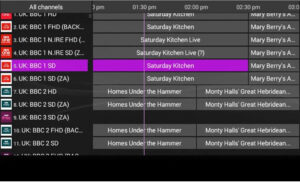
What Is an EPG in IPTV?
In simple terms, an IPTV EPG is the digital equivalent of a printed TV listings guide — delivered directly to your IPTV player app or set-top box. It displays a schedule of what’s currently airing and what’s coming up across all your channels, typically covering anywhere from a few hours to a full 7-day EPG window.
EPG data is linked to your IPTV channels via an EPG URL (also called an XMLTV URL) — a web address provided by your IPTV provider that your player fetches and displays as a programme grid. Without a proper EPG URL, your channel list shows no guide data at all.
How Does IPTV EPG Work?
Your IPTV EPG works in three steps:
- Your IPTV provider generates EPG data in XMLTV format and hosts it at an EPG URL.
- Your IPTV player (TiviMate, IPTV Smarters, GSE Smart IPTV, etc.) fetches that EPG source URL at regular intervals.
- The guide data is mapped to your channels and displayed as a programme grid in the app.
Most modern IPTV players allow you to configure your EPG URL in settings and set an auto-refresh interval — so guide data stays current without any manual effort.
Key Features of IPTV EPG
7-Day Programme Schedule The best IPTV EPG implementations show up to 7 days of programming per channel — letting you plan ahead, set reminders, or schedule recordings well in advance.
Programme Descriptions Each show entry includes a summary or review, making it easy to decide what to watch without leaving the guide.
Channel Logos (Picons) Picons are channel logos displayed alongside the EPG schedule, making it fast and intuitive to identify your channels in long lists. Your IPTV provider or community packs typically supply Picon libraries.
Recording via EPG One of the most powerful IPTV EPG features is scheduled recording. In apps like TiviMate (with TiviMate Premium) and Enigma2, you can tap any programme in the guide and set it to record automatically — never missing a show again.
Parental Controls EPG menus in many IPTV players and set-top boxes include content-rating filters, allowing parents to restrict access to specific channels or content categories.
Pay-Per-View Integration Some IPTV providers integrate pay-per-view IPTV events directly into the EPG, allowing you to purchase and watch exclusive sporting events or special broadcasts from within the guide.
Programme Search & Categorization Advanced EPG implementations let you search across all channels and filter by category — sports, news, movies, entertainment — so you can quickly find exactly what you want.
Best EPG Sources & EPG URLs for IPTV
Choosing the best EPG for IPTV depends on your region and IPTV provider. Here are the main options:
From Your IPTV Provider The simplest option — most IPTV providers supply an EPG URL with your subscription. When using Xtream Codes, EPG often loads automatically without any manual URL entry.
Free EPG Sources Several free XMLTV-based EPG sources are available online for common channel lineups. These are useful if your provider doesn’t supply guide data. Search for “best free EPG source URL” for your region to find current XMLTV repositories.
TiviMate EPG Sources For TiviMate users, configuring the TiviMate EPG is done via Settings → Playlist → EPG Sources — where you add your EPG URL and set the refresh schedule. The best EPG for TiviMate is usually your provider’s built-in URL, or a community XMLTV source if EPG data is missing for certain channels.
EPG.best & Similar Aggregators Services like epg.best aggregate XMLTV data from multiple sources and provide a single free EPG source URL covering hundreds of channels globally.
How to Add an EPG URL to Popular IPTV Players
| Player | Where to Add EPG URL |
|---|---|
| TiviMate | Settings → Playlist → EPG Sources → Add EPG URL |
| IPTV Smarters Pro | Add User → Install EPG → Enter EPG URL |
| GSE Smart IPTV | Settings → Remote Playlists → EPG URL field |
| Smart IPTV (SIPTV) | siptv.eu/mylist/ → EPG URL field |
| Enigma2 | Menu → Setup → EPG → Enter EPG URL |
| VLC | Not supported natively |
FAQs
1. What is an EPG in IPTV?
An IPTV EPG (Electronic Program Guide) is a digital TV schedule that shows current and upcoming programmes for each channel in your IPTV player. It replaces the traditional printed TV guide and can display up to 7 days of programming with descriptions, Picons, and recording options.
2. What is an EPG URL?
An EPG URL is a web address (in XMLTV format) that your IPTV player fetches to display programme guide data for your channels. Your IPTV provider should supply this URL with your subscription. It’s also called an EPG source URL or XMLTV URL.
3. How do I add EPG to TiviMate?
Go to Settings → Playlist → EPG Sources in TiviMate, tap Add EPG, and enter your EPG URL. Set the refresh interval and tap Save. If using Xtream Codes, TiviMate often loads EPG automatically without a separate URL.
4. What is the best EPG for IPTV?
The best EPG for IPTV is the one provided directly by your IPTV provider via your Xtream Codes credentials or M3U URL — it’s already mapped to your exact channel list. For missing channels, the best free EPG source URL options include epg.best and regional XMLTV community repositories.
5. What is the best free EPG source URL for TiviMate?
The best free EPG for TiviMate depends on your region and channel lineup. epg.best is a widely used free aggregator. Your IPTV provider’s built-in EPG URL is always the most accurate option for matching guide data to your specific channel list.
6. Why is my IPTV EPG not loading?
Common causes include an incorrect or expired EPG URL, a misconfigured refresh interval in your player, or your IPTV provider’s EPG server being temporarily down. Try refreshing the EPG manually in your player settings, or contact your provider to confirm the correct EPG source URL.
7. Is EPG safe to use?
Yes — EPG itself is simply a data feed of TV schedules in XMLTV format. It contains no executable code and poses no security risk. As always, use EPG URLs from your trusted IPTV provider or established community sources.
8. Does Roku support EPG for IPTV?
Roku EPG support depends on the IPTV app you’re using. The Roku Smarters Player and other dedicated Roku IPTV apps support EPG via an EPG URL. Basic Roku streaming apps may not include guide functionality.
9. Can I use EPG for recording on TiviMate?
Yes — TiviMate recording via EPG is one of the most popular features of TiviMate Premium. Tap any programme in the TiviMate EPG and select Record. The recording saves to connected storage and can be accessed in the Recordings section of the app.
10. What is the difference between EPG and a TV Guide?
A traditional printed TV guide is static and covers a single day. An IPTV EPG is dynamic, updated automatically, covers up to 7 days of programming, and includes interactive features like recording scheduling, parental controls, and pay-per-view IPTV integration.