
Plex is one of the most popular media server platforms available today, allowing users to organize and stream their entire multimedia library — movies, TV shows, music, and photos — across virtually any device. From Smart TVs and FireStick to Roku, Apple TV, and PS4, Plex media server brings all your content together in one polished, easy-to-use interface.
It is frequently compared to Kodi (formerly XBMC) — and understanding the Kodi vs Plex difference is key to choosing the right platform for your IPTV streaming setup.
Plex vs Kodi – What’s the Difference?
| Feature | Plex | Kodi |
|---|---|---|
| Type | Proprietary (closed-source) | Open-source |
| Ease of Use | Very user-friendly | More technical |
| Customization | Limited | Extensive (skins, add-ons) |
| IPTV Support | Via IPTV add-ons/DVR | Via PVR IPTV Simple Client |
| Kodi Add-ons | ❌ | ✅ (vast library) |
| Piracy Risk | None (strict controls) | Possible (third-party add-ons) |
| Cross-Platform | ✅ | ✅ |
| Media Server | ✅ (server-client model) | ❌ (local only) |
Kodi is open-source and highly flexible — perfect for users who want full control and access to Kodi add-ons for live IPTV streaming. Plex is proprietary, more polished, and designed for users who want a clean, secure way to organize and stream their legitimate media library across multiple devices.
What Is Plex Media Server?
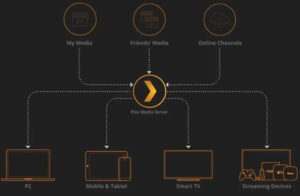
Plex media server works on a server-client model:
- The Server — Installed on your PC, laptop, or NAS, it stores and organizes your media library.
- The Client — Any device running the Plex app (Smart TV, smartphone, tablet, Roku, FireStick, PS4, Apple TV) that connects to your server to stream content.
This means you can watch your home media collection on any device, anywhere — even remotely over the internet.
Key Features of Plex Media Server
Cross-Device Compatibility Plex supports a wide range of devices for seamless IPTV streaming and media playback: Smart TVs, Apple TV, Roku, FireStick, Android, iOS, PS4, Xbox, and more. Once your server is set up, all these devices can access your full media library instantly.
Automatic Content Tracking Plex automatically marks content as “watched” and picks up where you left off across all devices — ideal for binge-watching TV shows or keeping track of your IPTV VOD library.
Smart Content Organization Plex automatically categorizes your movies, TV shows, music, and photos with metadata, cover art, and descriptions — making it easy to browse even large media collections.
IPTV via Plex DVR & Live TV While Plex is not a dedicated IPTV player, it supports IPTV streaming through its Live TV & DVR feature (requires Plex Pass). You can connect a compatible tuner or M3U playlist to access live channels directly within the Plex interface.
Media Sharing Share your Plex library with friends and family — they get their own access with personalized watched status, all served from your Plex media server.
Plex on Roku
Roku is one of the most popular media streaming boxes — and Plex integrates seamlessly with it. Install the Plex app on your Roku device to access your full Plex media server library, including any IPTV content you’ve set up via the Live TV feature.
Note: Unlike Plex, Kodi is not officially supported on Roku. To use Kodi on Roku, you would need to use screen mirroring from another device — a workaround that limits the full Kodi experience.
For Roku IPTV streaming, the Roku Smarters Player (8,100 monthly searches) is the most popular dedicated IPTV app for Roku users outside of Plex.
Plex on PS4
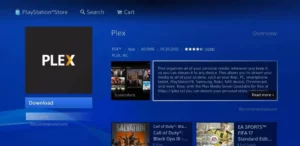
Plex on PS4 turns your gaming console into a full-featured media center. Install the Plex app from the PlayStation Store, connect it to your Plex media server, and stream movies, TV shows, and even IPTV content directly on your TV via your PS4 — no additional streaming device needed.
Plex on FireStick & Smart TV
Plex on FireStick and Smart TVs works exactly the same way. Install the Plex app, sign in to your account, and your entire Plex media server library becomes available. If you’ve configured IPTV streaming through Plex’s Live TV feature, your channels will appear directly in the app.
FAQs
1. What is Plex media server?
Plex media server is a proprietary platform that lets you organize your multimedia content on a central server (PC, laptop, or NAS) and stream it to any device running the Plex app — including Smart TVs, Roku, FireStick, Apple TV, PS4, and mobile devices.
2. What is the difference between Kodi and Plex?
In the Kodi vs Plex debate: Kodi is open-source, highly customizable, and supports a vast range of Kodi add-ons for live IPTV streaming. Plex is proprietary, more user-friendly, and offers a polished server-client media experience. Kodi is better for advanced IPTV users; Plex is better for organizing a legitimate media library.
3. Can I use Plex for IPTV streaming?
Yes — Plex supports IPTV streaming through its Live TV & DVR feature (Plex Pass required). You can connect an HDHomeRun tuner or in some setups an M3U playlist to watch live channels. For a dedicated IPTV player experience, apps like TiviMate, IPTV Smarters Pro, or Kodi with PVR plugins are better suited.
4. Is Plex better than Kodi for IPTV?
For IPTV streaming specifically, Kodi is generally the better choice due to its PVR IPTV Simple Client, Kodi add-ons, and full M3U playlist support. Plex excels at organizing and streaming a personal media library across many devices. The best setup for many users is using both: Plex for personal media and Kodi or TiviMate for live IPTV.
5. Does Plex work on Roku?
Yes — Plex integrates directly with Roku via the Plex app in the Roku Channel Store. Note that Kodi is not officially supported on Roku — for Kodi on Roku, screen mirroring is required. For dedicated Roku IPTV apps, the Roku Smarters Player is a popular alternative.
6. Can I use Plex on PS4?
Yes — install the Plex on PS4 app from the PlayStation Store, connect to your server, and stream your full media library including any live TV or IPTV content you’ve configured.
7. Is Plex free?
The basic Plex media server is free. Plex Pass (monthly/annual/lifetime subscription) unlocks premium features including Live TV & DVR, offline sync, mobile sync, and advanced music features — all relevant for an enhanced IPTV streaming experience.
8. What devices are compatible with Plex?
Plex supports: Smart TVs (Samsung, LG, Sony), FireStick, Roku, Apple TV, Android, iOS, PS4, PS5, Xbox, Chromecast, web browsers, Windows, Mac, and Linux. It’s one of the most cross-platform media server solutions available.
9. Can Kodi replace Plex?
Kodi can handle local media playback and live IPTV streaming, but it lacks Plex’s server-client model, remote access, and polished multi-device library sync. For pure IPTV use, Kodi (with Kodi add-ons) is more powerful. For a whole-home media library, Plex is the superior solution.
10. What is the best IPTV streaming setup in 2025?
A popular combination is: Plex media server for movies and TV show libraries + TiviMate or IPTV Smarters Pro for live IPTV streaming — running on a FireStick, Roku, or Android TV box. This gives you the best of both worlds: polished media organization and a dedicated IPTV player.
Conclusion
Plex media server is an excellent platform for users who want to stream their personal media library across multiple devices with minimal setup. While it’s not a dedicated IPTV player, its Live TV & DVR features (via Plex Pass) bring IPTV streaming capabilities to the platform. For users comparing Kodi vs Plex, the choice comes down to flexibility vs ease of use — and for many, using both together delivers the ultimate home streaming experience.